How a Tattoo Artist Can Manage Clients, Sessions, and Income — Without CRM or Paperwork

Max is a tattoo artist with a loyal client base and a fully booked week. His hands are steady, his portfolio is strong — but his booking system is a mess. Session details live in Instagram DMs, deposit records sit in a notes app, and his income for the month is somewhere between “probably good” and “hard to say.”
When a returning client asks about the piece they started two months ago, Max scrolls DMs for ten minutes. When tax season comes, he’s guessing. When a Wednesday slot goes empty, he can’t tell if he’s losing $200 or $1,500 a month.
If this sounds familiar, you’re not alone. Most solo tattoo artists run their business on a patchwork of DMs, notebooks, and memory — and it silently eats into earnings.
Why Tattoo Client Management Is Uniquely Hard
Tattoo work isn’t like most service businesses. Sessions are long, references matter, deposits change hands, and a single piece can span weeks. Common pain points:
- Long sessions with references — you need to pull up the design and client notes quickly before each appointment
- Deposits and partial payments — clients pay in stages; keeping track manually is error-prone
- Repeat visits for one piece — a full sleeve can take 4–8 sessions across months
- Client history matters — skin type, pain tolerance, allergies, placement preferences
- Most bookings come via DM — Instagram, WhatsApp, Telegram — scattered across apps
For a tattoo artist charging $150–$400 per session, one empty slot per week means $600–$1,600 per month in lost revenue — usually from something as small as a forgotten reminder or a missed follow-up.
Why Paper Notebooks and DMs Don’t Cut It
You might have tried it all: a leather-bound appointment book, a Google Calendar, pinned DMs in Instagram, a whiteboard by the chair. These half-solutions fail the same way:
- You can’t search — scrolling a notebook for a client from three months ago takes minutes
- No reminders — clients forget, and so do you
- Income is invisible — you feel busy but have no idea what you actually earned
- One lost notebook or deleted chat means your entire history is gone
- Constant app-switching — calendar, DMs, notes, calculator, back to calendar
You don’t need enterprise software. You need a single tool that lives on your phone, works offline at any studio, and handles the three things that actually matter: who is coming, what they want, and what you earned.
What a Tattoo Artist Actually Needs from a Booking Tool
Traditional CRMs were built for sales teams — pipelines, funnels, dashboards, email marketing. Tattoo artists use about 5% of those features and pay $30–$70/month for the privilege.
Here’s the short list of what you actually need:
- A clear daily view of who’s coming in and what service they booked
- Quick actions — call, edit, duplicate a booking in one tap
- Per-client notes — references, skin notes, placement, allergies, session history
- Monthly income stats — revenue, expenses, net profit, average session price
- Offline access — no internet required; your schedule works anywhere, including remote studios and conventions
- No subscription, no account — your data stays on your device
That’s it. A tool like this replaces the notebook, the spreadsheet, and the expensive CRM in one shot.
Your Daily View: Today’s Sessions at a Glance
When you open the app, the first thing you see is today. One tap reveals the next seven days. Each session shows the client’s name, the service type, the price, and the start time — no digging required.
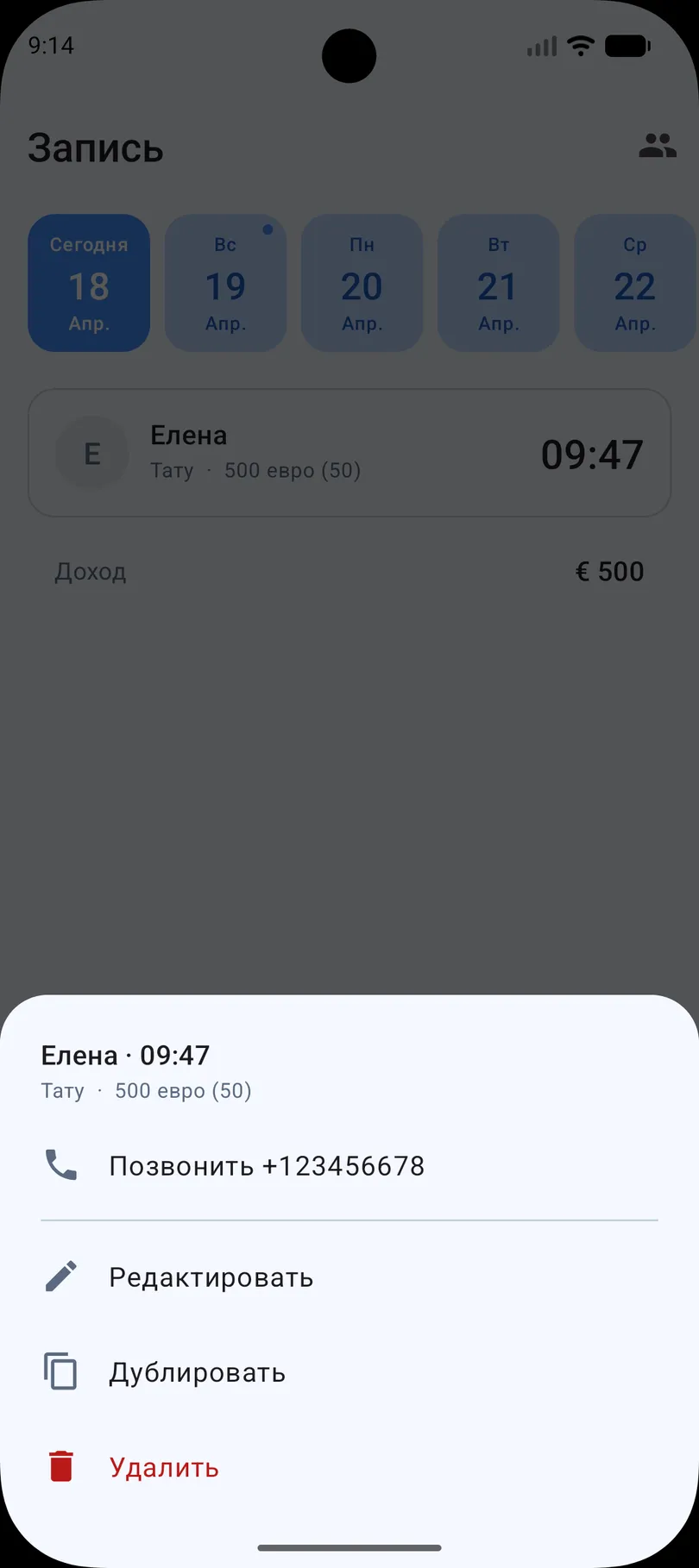
Below the list, the daily income total updates automatically as you add, edit, or complete sessions. No spreadsheet to maintain, no math at the end of the day.
This view answers the “what’s my day look like?” question every tattoo artist asks first thing in the morning — before coffee, before unlocking the studio.
Fast Actions — Long-Press Any Booking
Need to call a client because they’re running late? Want to duplicate a recurring touch-up appointment? Delete a cancellation? Press and hold the booking — a quick action menu appears with everything you need.
- Call — dials the client’s saved phone number directly, no switching apps or digging through contacts
- Edit — change the service, price, or time if plans shift
- Duplicate — create the next booking in the sequence for multi-session pieces in two taps
- Delete — cancel cleanly when a client reschedules
The Duplicate action is especially useful for tattoo work. A full sleeve might need 5–8 sessions — you create the first one, duplicate it for the next appointment, and just update the date. No retyping the service, price, or client info.
Every action that normally takes four taps through nested menus takes one long-press and one tap. Over a week, that’s minutes saved. Over a year, it’s hours you didn’t waste on friction.
Know Your Real Income — Not Just a Busy Feeling
“Busy enough” isn’t a financial metric. You need to know, at a glance, what you earned this month and what you spent — so you can price your work correctly, spot slow weeks early, and file taxes without a panic.
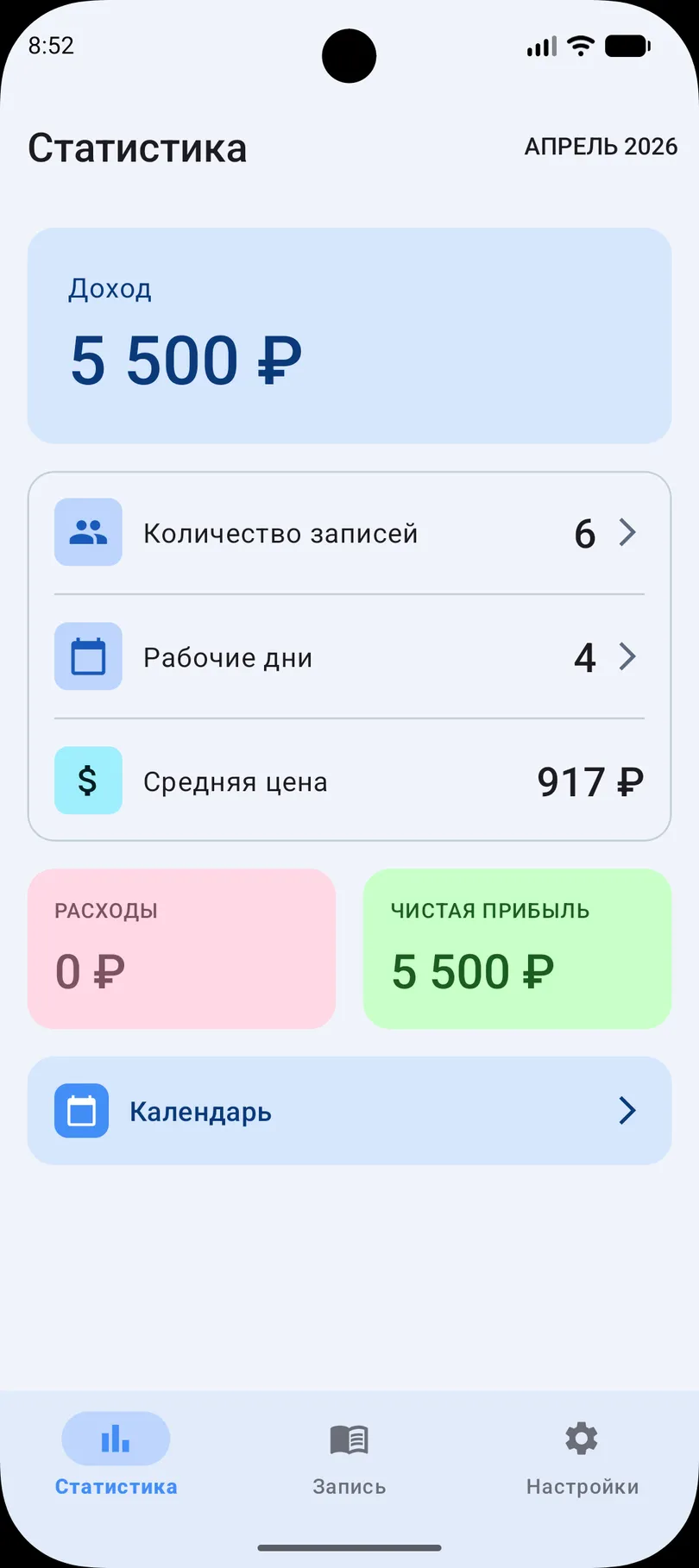
The stats screen gives you the numbers that matter:
- Total monthly income — all completed sessions summed automatically
- Number of bookings — raw session count, useful for month-over-month comparison
- Working days — how many days you actually tattooed
- Average session price — a quick signal if you’re undercharging or drifting
- Expenses — inks, needles, stencil paper, rent share; log them as they happen
- Net profit — income minus expenses; your actual take-home
A tattoo artist who discovers their average session is $180 when they thought it was $250 has just found the reason their rent feels tight. Numbers you can see are numbers you can act on.
Tap the calendar on the stats screen and you can drill into any previous month — compare March to April, see if the summer slowdown was real, or prove to yourself that your portfolio upgrade actually moved the needle.
Offline, Private, and Yours
Tattoo conventions, guest spots in other cities, home studios with spotty Wi-Fi — your booking app needs to work without internet. It also needs to respect that client data — phone numbers, addresses, health notes — is sensitive.
- Everything stored locally on your phone — no cloud, no account, no server
- Works in airplane mode — conventions, basements, bad networks, no problem
- No signup required — install, open, start booking
- Your data is yours — no company is analyzing it, selling it, or holding it hostage behind a subscription
Your client list doesn’t belong on some company’s server. A tattoo artist’s bookings are their livelihood — keeping them private and local isn’t a nice-to-have, it’s the baseline.
Before and After: Max’s Story
Before — DMs, notes, and a scratched-up notebook:
Max ran his booking out of Instagram DMs and a small notebook. He forgot to send deposit reminders twice a month. He had no idea what his average session price was. Three clients “ghosted” per month because he couldn’t follow up in time.
- Estimated revenue loss: $900–$1,800/month from no-shows and missed rebookings
- Time spent hunting for client info: 15–20 minutes per day
- Income visibility: zero — “probably around $X” was his best answer
After — two months with the app:
Max added all his regular clients over a weekend. Every new Instagram inquiry gets booked directly in the app with a note. Multi-session pieces use Duplicate — one tap, new date. Payments logged after each session.
- No-shows dropped from 6–8 to 1–2 per month
- Recovered $700–$1,200/month in previously lost bookings
- Discovered his Thursday evening slots had a 40% no-show rate — he moved touch-ups into that window and filled the prime evenings with color-heavy sessions
- Actual monthly profit visible for the first time — and it was 20% higher than he’d estimated
“I didn’t realize how much of my day was spent just finding information. Now I press and hold, I call, I’m back to work. It’s stupid how much calmer everything got.” — Max, tattoo artist
Who Else Benefits
While this article focuses on tattoo artists, the same workflow fits any solo appointment-based professional:
- Piercers — short sessions, repeat visits for aftercare check-ups
- Permanent makeup artists — multi-session procedures, touch-ups every 1–2 years
- Barbers and hairstylists — regular clients with preferred services
- Nail technicians — recurring fills and touch-ups
- Lash artists — 2–3 week rebooking cycles
If you book clients, deliver a service, and track your own income — this is the tool built for you.
Getting Started in Five Minutes
No tutorials, no account setup, no data import.
- Download the app — free, no sign-up, no subscription
- Add your regular clients — name, phone, a few notes (skin type, past work, preferences)
- Book this week’s sessions — tap the plus, choose the client, set time and price
- Check the stats screen at the end of the month — income, bookings, and profit appear automatically
Within a week, you’ll never reach for the notebook again.
Tattoo artists don’t need a CRM. They need a calendar, client notes, quick actions, and clear stats — all on the phone, all offline, all private. Try My Clients for free, no sign-up required.
You might also find useful
Start organizing your clients today