Your Regulars Are Quietly Drifting Away. Here's How to Find Them in Under a Minute

Sofia has 60+ regulars on her books. They come every three weeks, like clockwork — until they don’t. No dramatic exit, no angry message. They just stop. One missed cycle, then two, and by the third you’ve already forgotten they used to be a Saturday-morning regular.
This is silent churn — the kind that doesn’t show up in any single conversation, only in the slow erosion of your week. And the worst part: you can’t fix what you can’t see.
Until now, the only way to spot it was to scroll through every client and squint at last-visit dates. That’s why most solo pros never do it.
The Silent Churn No One Talks About
A regular doesn’t quit. They just fade. They get a deal somewhere closer to home. They have a baby. They book once with a friend’s daughter as a favor and forget to come back. None of that produces a notification.
For a solo nail tech, barber, lash artist, or massage therapist, the cost adds up fast:
- Each regular is worth thousands per year — at $50–$80 per visit on a 3-week cycle, one regular = $850–$1,400/year
- 15–20% of regulars drift off quietly each quarter — that’s the industry-average attrition for appointment-based businesses
- You don’t notice the gap — the slot gets filled by a one-off walk-in, the calendar still looks full
- Re-acquiring a new client costs 5–7× more than winning back an old one — but only if you know who to call
If you keep 60 regulars and lose 12 quietly each quarter, that’s roughly $10,000–$17,000 of recurring revenue walking out the door every year — and you won’t see it in any single week.
Meet Sofia, the Nail Tech With 60 Regulars
Sofia runs her studio solo. Sixty repeat clients on rotation, mostly on a 3-week cycle. Her calendar is full most weeks, so on the surface everything looks fine.
But last quarter she sat down and made a list of who she’d actually seen in the past three months. The number was 48. Twelve regulars had quietly disappeared — and she hadn’t called a single one. Not out of laziness; she simply didn’t know who they were until she went looking.
She didn’t need new clients. She needed a way to see her existing ones through a different lens.
What the New Filters Actually Do
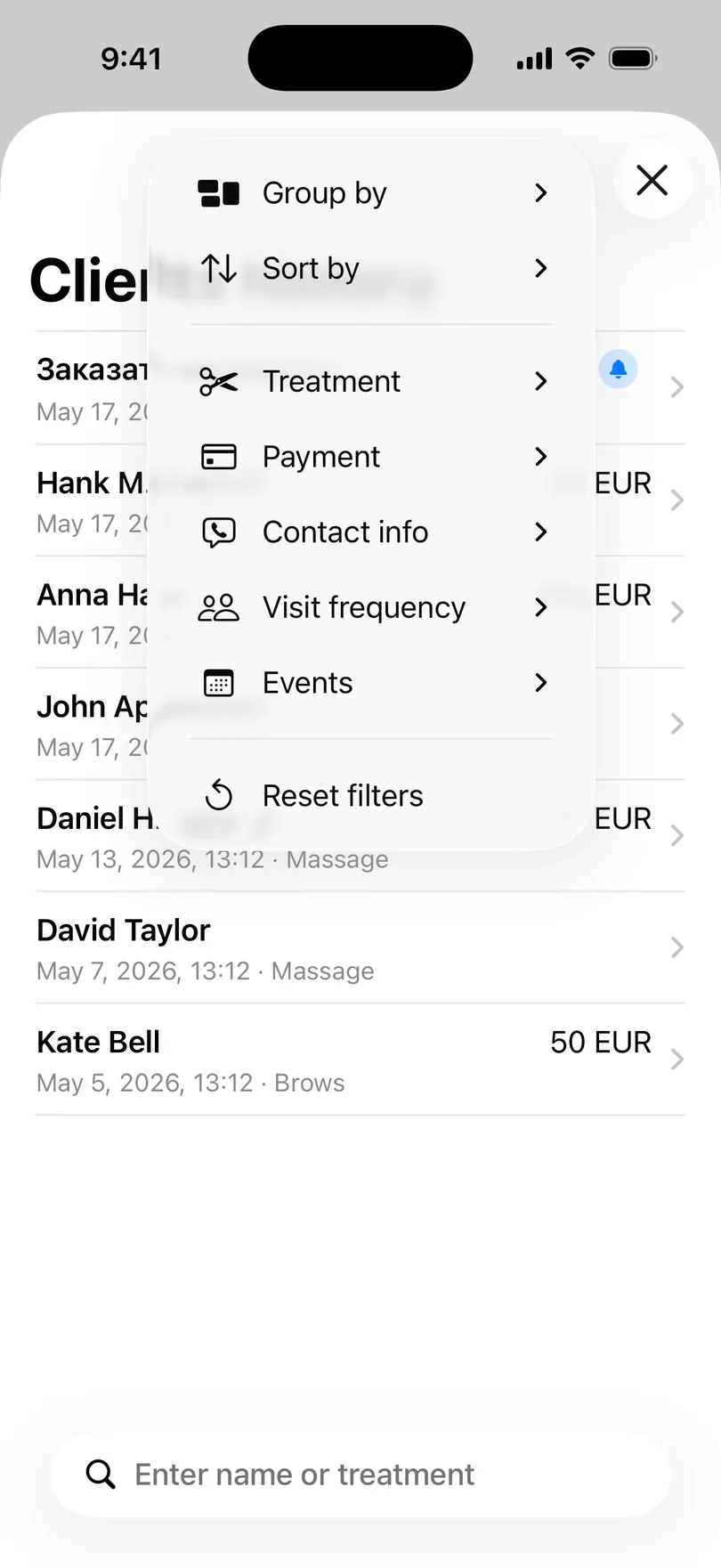
The client history screen in My Clients now has a filter panel that turns your flat list into a tool you can actually segment. Tap the filter icon and you can slice your clients by:
- Visit Frequency — New (1 visit), Returning (2–5), Regular (6+), or Lapsed (90d+)
- Treatment — only show clients who came for brows, massage, tattoo, or any service you’ve ever recorded
- Payment — find unpaid visits, cash-only clients, or specific payment methods
- Contacts — clients with phone numbers, Instagram handles, or no contact info at all
- Grouping & Sorting — group by month, sort by last visit, or by revenue
The whole panel lives on top of your existing history — nothing changes about how you record visits. The filters are just a different way to read the same data.
The Win-Back Filter: “Lapsed (90d+)”
This is the filter that pays for itself the first time you use it.
Tap Visit Frequency → Lapsed (90d+), and the list collapses to exactly the people who used to come and stopped. Not new clients. Not one-offs. Your lapsed regulars — the ones with three, five, ten previous visits whose history simply went quiet.
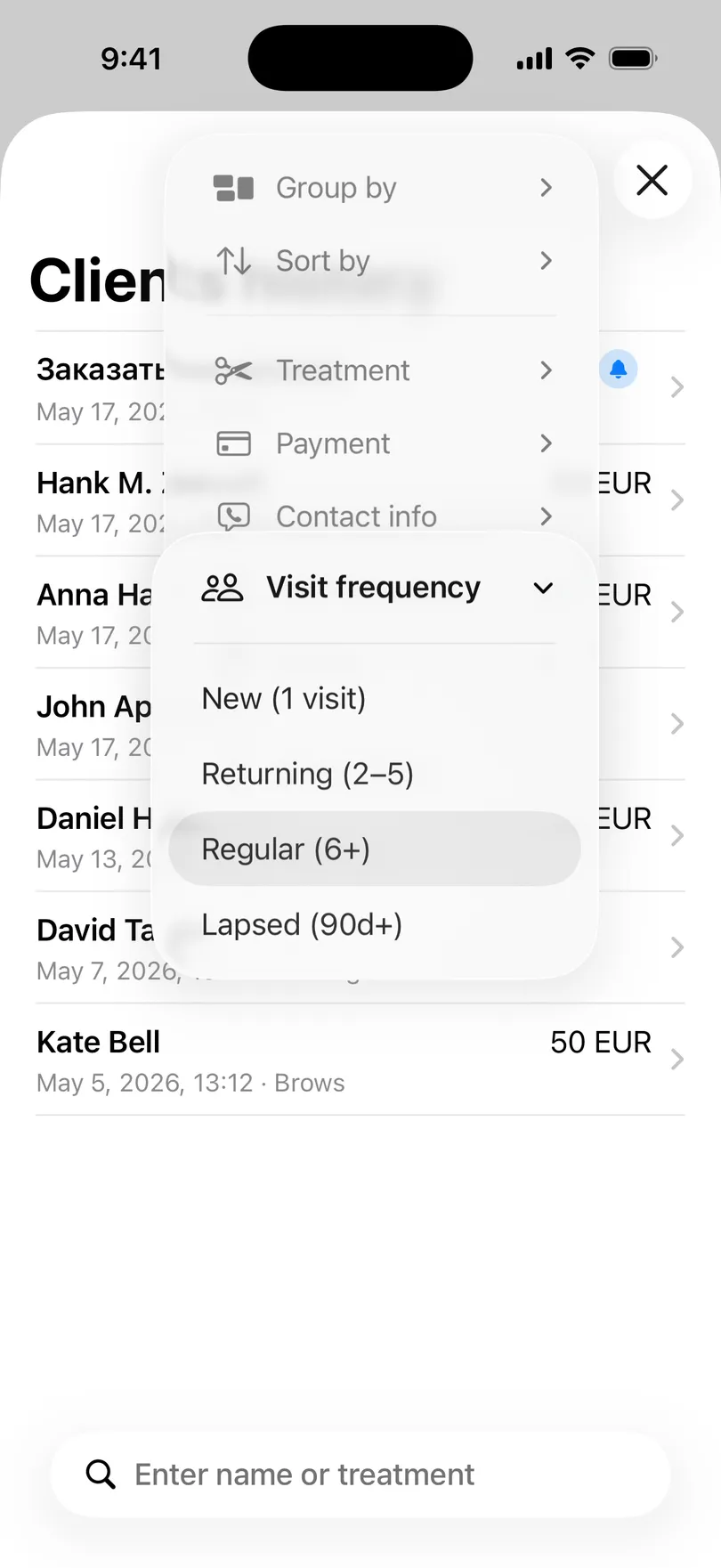
Sofia ran this filter on a slow Tuesday afternoon. The list returned 18 names. Some she’d already written off in her head. Others made her say “oh, right — I wonder what happened to her.”
Here’s the script she used for the next hour:
- Pull up the client card to see what service they came for last and when
- Send a short personal message — not a promo, just “Hey, it’s been a while — want to grab your usual slot next week?”
- Move on after 30 seconds if there’s nothing to say
Of the 18 messages, 7 replied within a day. 4 rebooked that week.
One Tuesday afternoon, four lapsed regulars back on the books — roughly $280 recovered immediately, plus a restored 3-week cycle worth $2,400 over the next year if even half of them stick.
Filter by Treatment — See Where the Money Actually Comes From
Sofia also offers brows occasionally and trades massage sessions with a friend who runs a different studio. On paper, nails are her main thing. But she’d never actually checked.
Filter by Treatment → Brows and the list shows only the brows clients. Switch to Massage — only massage. You can see at a glance which service has the most regulars, which has the most lapsed clients, and which one is quietly carrying more revenue than you assumed.
Every service you’ve ever recorded becomes a filter option automatically — no setup, no taxonomy, no admin screen. The filters read your data and adapt.
This is the part that surprises most pros: when you combine Treatment: Brows with Visit Frequency: Lapsed (90d+), you get the exact list of brows clients you’ve lost. Now you can decide — is it the service, the price, or just life getting in the way?
The filters compose. Treatment + lapsed = a recovery list. Treatment + regulars = your true core. Payment: unpaid + last 30 days = invoices you forgot to chase.
The Filters That Quietly Save Time
Visit frequency and service are the headline acts, but the rest of the panel earns its place too:
- Sorting by last visit — see who’s overdue at a glance, no scrolling required
- Grouping by month — instantly tells you how many new clients you got in March vs. April
- Filter by Payment — pull up every cash-only client before tax season, or every unpaid visit you still need to invoice
- Filter by Contacts — find every client with no phone number saved and add one in a single sitting
None of these are flashy. All of them save a 20-minute scrolling session that you used to do once a quarter — or, more honestly, never.
Sofia’s Saturday — Before and After
Before — without filters:
- Scrolling through 60+ names trying to remember who hadn’t been around
- “I’ll go through them this weekend” → never actually happens
- Lost regulars discovered 6 months later, when it’s too late to reach out
- About 3–4 lapsed regulars permanently lost per quarter — $3,000+/year in forgotten cycles
After — with rich filters:
- One tap → “Lapsed (90d+)” → instant list
- 30–60 minutes of personal messages on a slow afternoon
- 4 rebookings from a 30-message Tuesday — roughly $280 recovered the same week
- Cycle restored for half of them → ~$2,400/year of recurring revenue saved
“I thought I knew my clients. The filter showed me twelve people I hadn’t even noticed I lost. Four of them came back the same week I messaged them.” — Sofia, nail tech
Who Gets the Most Out of This
The visit-frequency filter is most powerful for businesses where clients are supposed to come back on a cycle:
- Nail techs and lash artists — 2–3 week cycles, drift is invisible
- Barbers — 3–4 week cuts, regulars churn silently to whoever’s closer
- Massage therapists — monthly clients, one skipped month is the start of the end
- Brow artists and aestheticians — 4–6 week routines, easy to lose track
- Personal trainers and tutors — weekly sessions, but holidays can erode the cycle
If your business runs on repeat visits at regular intervals, the lapsed filter is essentially a free retention report.
How to Use It in Under a Minute
- Open the client history screen in My Clients
- Tap the filter icon in the top corner
- Choose Visit Frequency → Lapsed (90d+)
- Optionally add a service filter to narrow further
- Tap a name to see their last visit, what they had, and contact info — then reach out
That’s it. No segmentation logic, no CSV exports, no CRM dashboard. Just your existing client list, viewed through a smarter lens.
Conclusion
Most solo pros don’t lose clients in big dramatic moments. They lose them in the quiet weeks no one’s tracking. The new filter panel in My Clients gives you a way to see your book the way a CRM would — without paying for a CRM, signing up for anything, or moving your data anywhere.
A quick recap of what filters unlock:
- Find lapsed regulars in one tap with the 90-day visit-frequency filter
- See per-service performance without scrolling — just filter by service
- Combine filters to build mini-segments: lapsed brows clients, unpaid massage visits, cash regulars
- Recover real revenue with a 30-minute outreach session, not a marketing campaign
- Spot patterns early — before regulars are gone for good
Stop guessing who’s drifting away. Open My Clients, tap the filter icon, and find the people who used to come and stopped — free, no sign-up required.
You might also find useful
Start organizing your clients today