A Booksy Alternative for Solo Pros Who Don't Need a Booking Page

A trader on a market square doesn’t pay for her table. She pays for the pitch — for the hundred people an hour who walk past without having come looking for her.
A booking marketplace sells the same thing. The software is the table. The footfall is the pitch, and the pitch is what costs money.
So the question isn’t whether Booksy is good software. It is. The question is whether you’re trading on the square, or whether everyone who books you already has your number.
What Booksy costs, as of September 2026
These figures come from Booksy’s own US pricing page, read on 20 September 2026. Prices differ by country, so open your own before you do any arithmetic.
- $29.99 a month plus tax for one provider, everything included, unlimited bookings
- $20 a month for each extra team member
- A 14-day trial, no card and no commitment required
- Boost is free to switch on — then a one-time 30% fee on “the total cost of a Boost client’s first visit with you”
- Card processing, if you take payments through Booksy: 2.49% + $0.20 with Tap to Pay, 2.49% + $0.10 with their reader, 2.69% + $0.30 keyed in. Next-day payouts are free; 30-minute payouts cost 1.5%
- 2,000 marketing texts a month are included, and appointment confirmations and reminders are always free
- Card readers are $53.10 or $299, plus shipping
There are no higher tiers and no feature add-ons — one price, all the features. Booksy’s own footer puts it at a dollar a day, which is a fair way to describe it.
$29.99 a month is $359.88 a year before tax. On a $60 ticket that’s six appointments out of your year. The subscription is not the villain of this article — what it buys might be.
The line on the bill that moves
The subscription is flat. Boost isn’t, and Boost is where a solo book gets expensive quietly.
Say two people a month find you through the marketplace and book a $60 first visit. That’s 30% of $60, twice — $36 a month, $432 a year, on top of the subscription. More than the software costs.
That money is not wasted if those two people come back. A client who returns eight times a year at $60 is worth $480 a year, and you paid $18 once to meet her. Sold that way, Boost is the cheapest client acquisition in the trade.
It’s wasted when the fee lands on someone who was already yours. Booksy’s own FAQ is direct about it: share your profile link, get your regulars booking through it, and keep your client list current, and you won’t be charged a commission on existing clients while Boost is on. That sentence exists because the edge case exists.
Boost is a fee for introductions. Before you pay it, count the introductions: how many of your last twenty new clients did the marketplace actually send you?
Two minutes with your last invoice
This is the whole decision, and it takes less time than writing a caption.
- Open your last Booksy invoice and read the lines out loud — subscription, Boost commission, processing, anything else.
- Next to each feature you’re paying for, write the date you last used it. Marketplace profile. Boost. Gift cards. Memberships and packages. Intake forms. The waitlist. Email campaigns. The 2,000 texts.
- Add up the ones with no date. That’s your number.
For a solo pro who takes bookings in Instagram DMs and on WhatsApp, the list with no dates is usually long. The features that get used every single day are smaller and duller than the ones in the brochure:
- Today’s list — who’s coming, at what time, for what
- A phone number attached to each of those names
- A note saying oval shape, gentle remover, allergic to acetone
- What the day was worth, so you know what you earned before the month ends
If four things on that invoice have never been opened, you aren’t overpaying for software. You’re renting a shop window you never stand in.
Stay on Booksy if any of this is true
This is the part most “alternative to Booksy” pages leave out, because they’re written by the alternative.
- Your clients book themselves. If people expect to tap a slot at 11pm and be booked, keep the booking page. An offline app on your phone cannot do that, and no amount of positioning changes it.
- The marketplace brings you work. If Boost pays for itself twice over, it’s not a cost, it’s a channel. Don’t close a channel to save thirty dollars.
- You take cards in the app. Processing, deposits, no-show protection and payouts are one flow inside Booksy. Rebuilding that with a separate reader is a downgrade for most people.
- You want the messages to send themselves. Booksy’s confirmations and reminders go out automatically, and its subscription includes 2,000 marketing texts a month. If that’s how you fill quiet weeks, it’s doing real work.
- You have staff, or you’re about to. At $20 a month per extra person, a small team is cheap on Booksy, and a shared calendar is exactly what it’s for.
Any two of those and the rest of this article isn’t for you. Renew and go and do something better with your Sunday.
What’s actually left to replace
If none of them are true, look at what remains. Not a platform — four jobs.
A schedule you can see. Clients with numbers and history attached. A reminder that reaches the person the day before. Some idea of what the month earned. That’s the job, and it fits on a phone with no account and no subscription.
My Clients is an appointment book that lives on your device. No sign-up, no server, no booking page — you write the appointment in, the way you did in the paper diary, and everything else hangs off it: the client’s number, their visit history, the notes, the prepay, what the day was worth.
Reminders work the way DM booking already works. Your phone tells you about tomorrow’s appointments; when you want the client reminded, you hold the appointment, tap Notify client, and the message is already written with her name, the date and the time in it. You pick WhatsApp, SMS, Telegram or Instagram and press send yourself.
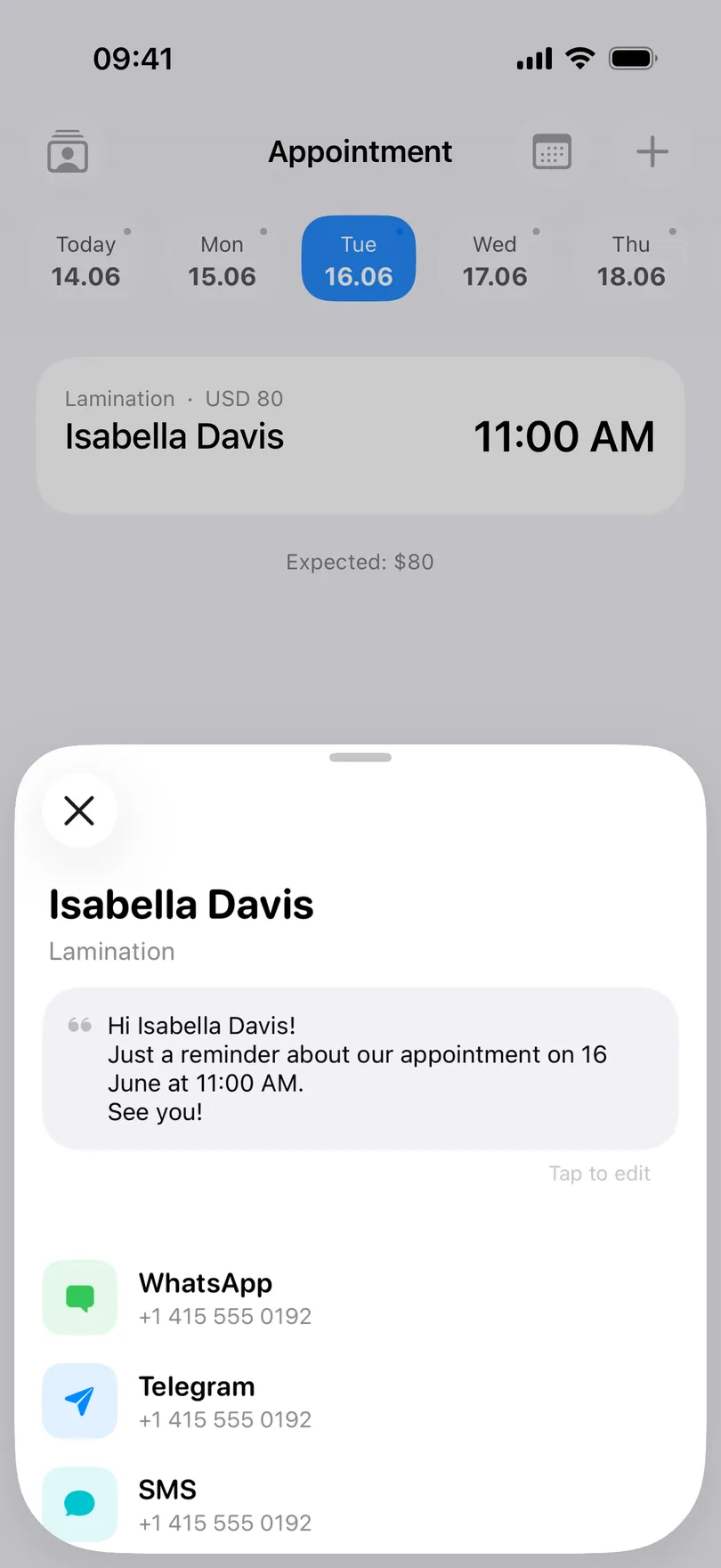
Be clear about what you’re giving up, because it’s real: no public booking page, no marketplace, no card payments, and nothing is sent to a client without you pressing send. The free version shows a banner ad. Statistics beyond the current month, expenses and profit, the month grid, PDF reports, calendar sync and most of the widgets are part of the paid tier (what Pro includes) — and on Android the client list itself sits in Pro, while on iPhone it’s free. Unlimited clients, unlimited appointments and the full history cost nothing on either.
Thirty dollars a month buys a shop window. If your window is already Instagram and a friend telling a friend, you’re paying for a second one.
Whatever you decide, leave with a copy
Do this before any renewal date, and do it even if you stay.
- Export your appointments to a spreadsheet. A client list you can read in Numbers or Excel is worth more than any feature, because it’s the thing you keep when you change your mind (export and import CSV).
- Write down last year’s totals — what each month earned, and how many appointments it took. You’ll want the comparison, whichever tool you’re using next year.
- Save the phone numbers to your contacts. Numbers that only exist inside a platform are numbers you’re renting.
- Keep the old tool running for two weeks alongside the new one. Cancel once a full cycle of regulars has been through.
An appointment book you can move between phones and platforms is the difference between a tool and a landlord (moving to a new phone).
The two-minute version
Count how many of your last twenty new clients the marketplace introduced. Then look at the list of features with no date next to them.
More than four of twenty came from the marketplace? Stay, switch Boost on deliberately, and make sure your regulars use your own link so you’re not paying introduction fees for people you already knew.
Fewer than two, and the feature list is mostly untouched? You’re paying $359.88 a year for a calendar with your clients in it, and that part is free.
The My Clients app is free, works with no internet and needs no account. Your bookings, your client history and your income stay on your phone — and nobody charges you a commission for a client who was always yours.
You may also like
Start organizing your clients today