“Anything Free on Friday?” Send Your Open Times as One Picture

The standard advice for “anything free on Friday?” is a booking link in your bio. Clients pick a time themselves, and the question stops arriving.
Plenty of people who work alone have looked at that and said no. With a link, a stranger books into your week before you’ve read a word from them: no chance to ask what they want done, whether it fits in an hour, or whether you want them in your chair at all. Answering by message keeps that decision with you.
What actually eats the evening is answering by hand: opening the calendar, reading off the gaps, typing them out, once per client, every night.
One question, eleven messages
Here is the shape of a typical thread. The names and times are made up; anyone who takes bookings by message will recognise the rhythm.
- 21:40, client: hi! anything free on friday?
- 21:52, you: Hi Anna! Friday I have 10 AM or 3 PM
- 22:15, client: ohh I work till 5. what about saturday?
- 22:16, you: Saturday’s full, sorry. Monday 6 PM?
- 22:31, client: monday I can’t 🙈 tuesday?
- 22:33, you: Tuesday 11 AM or 5 PM
- 23:04, client: 5 is great!!
- 23:05, you: Booked you in for Tuesday at 5 PM ✨
- 23:05, client: ❤️
- 08:10, client: sorry, what was the address again?
- 08:25, you: (address)
Eleven messages and an hour and a half of the evening, to fill one slot. Every one of your replies meant opening the calendar again, because the gaps on Friday aren’t something you carry around in your head. And the client never saw Thursday, which had four free times, because she asked about Friday.
A SalonGeek member put the problem in one line back in 2008, in a thread about clients who call and text out of hours: booking by text turns into a back-and-forth about times. That was 2008, two years before Instagram launched.
Say twenty of these a week, at about four minutes of your attention each once you count the calendar checks. That’s 80 minutes a week, about 64 hours a year. At $60 an hour, that’s $3,840 of evening nobody pays you for.
The weekly Story you type by hand
Some people solve it the other way round: every Sunday they post the week’s open times to their Stories, so the question gets answered before it’s asked. There’s a whole small market for this. Search Etsy for “weekly availability template” and you’ll find Canva Story templates for nail, lash and hair pros, with blank boxes for the times.
It works. It also has three weak spots:
- You still copy the times out by hand. The template gives you the boxes, and you fill them in from the calendar, one day at a time, getting 2 PM and 3 PM the right way round.
- It goes out of date on Monday morning. Two slots get booked and the Story still offers them. Fixing it means opening Canva again.
- A cancellation needs a whole new post. A slot that opens up on Wednesday afternoon is worth most in the first hour, and that’s exactly when you don’t have time to design anything.
Free Slots: the gaps, already worked out
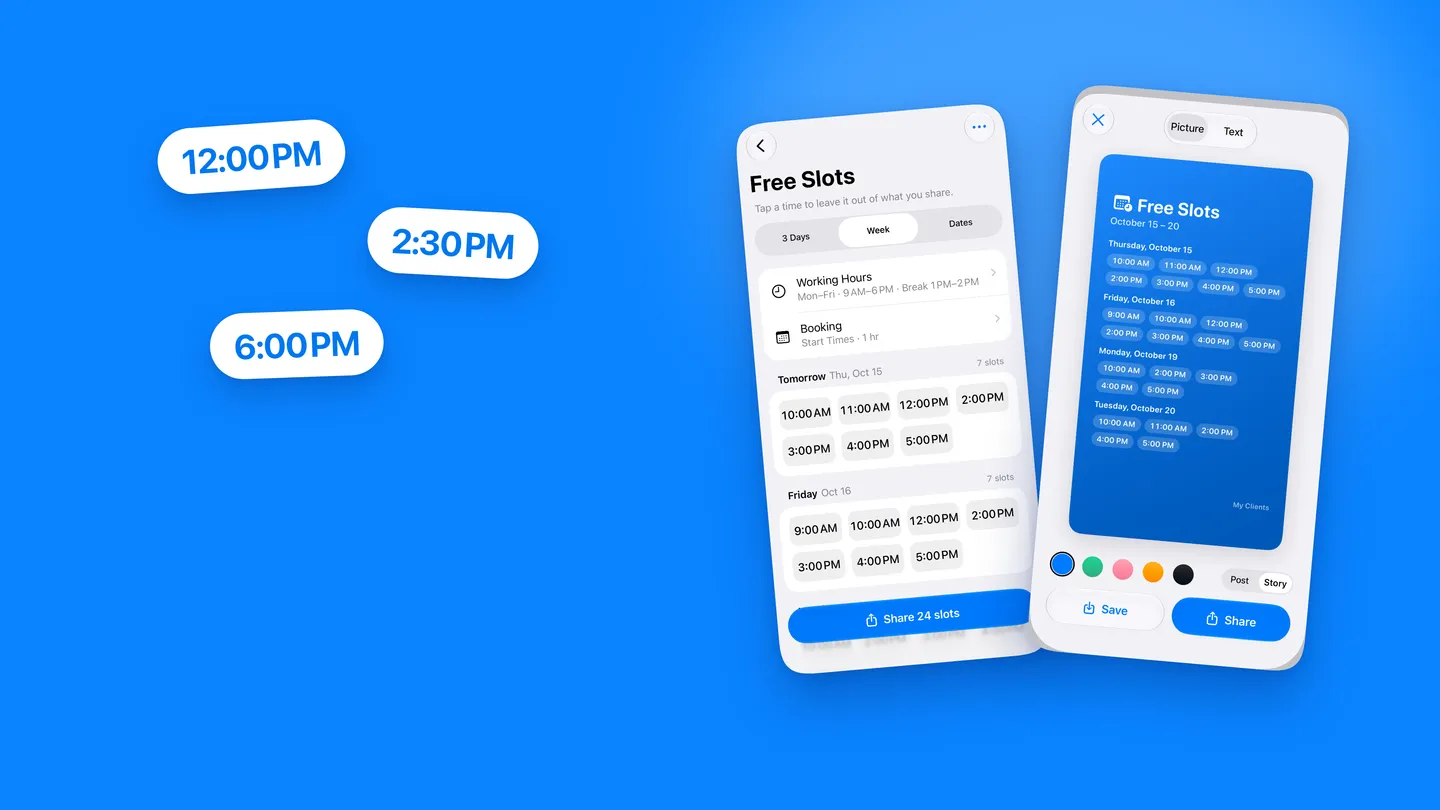
From version 1.9.7 on iPhone and 1.3.9 on Android, My Clients has a Free Slots screen. It reads your bookings and shows the times you could still take, day by day. You set two things once:
- Working Hours. Which days you work, opening and closing time, and one break. If the days differ, switch on Different hours per day. The first time you open the screen, a short setup suggests hours and a break from your last two months of appointments, if there are enough of them to go on.
- Booking. How long an appointment is, from 15 minutes to 4 hours. Whether clients get exact Start Times (10:00, 11:00, 12:00) or Time Ranges (10:00–13:00). A Break between clients, if you want ten minutes to clean up. And Minimum Notice, so nobody gets offered a slot that starts in 20 minutes.
After that, the screen does the calendar reading for you. A booking blocks its own length plus your break between clients. Days you’ve marked off in the calendar are skipped. Today’s times that have already passed, or are too close to now, aren’t offered. On iPhone, personal reminders like “Order supplies” block their time as well.
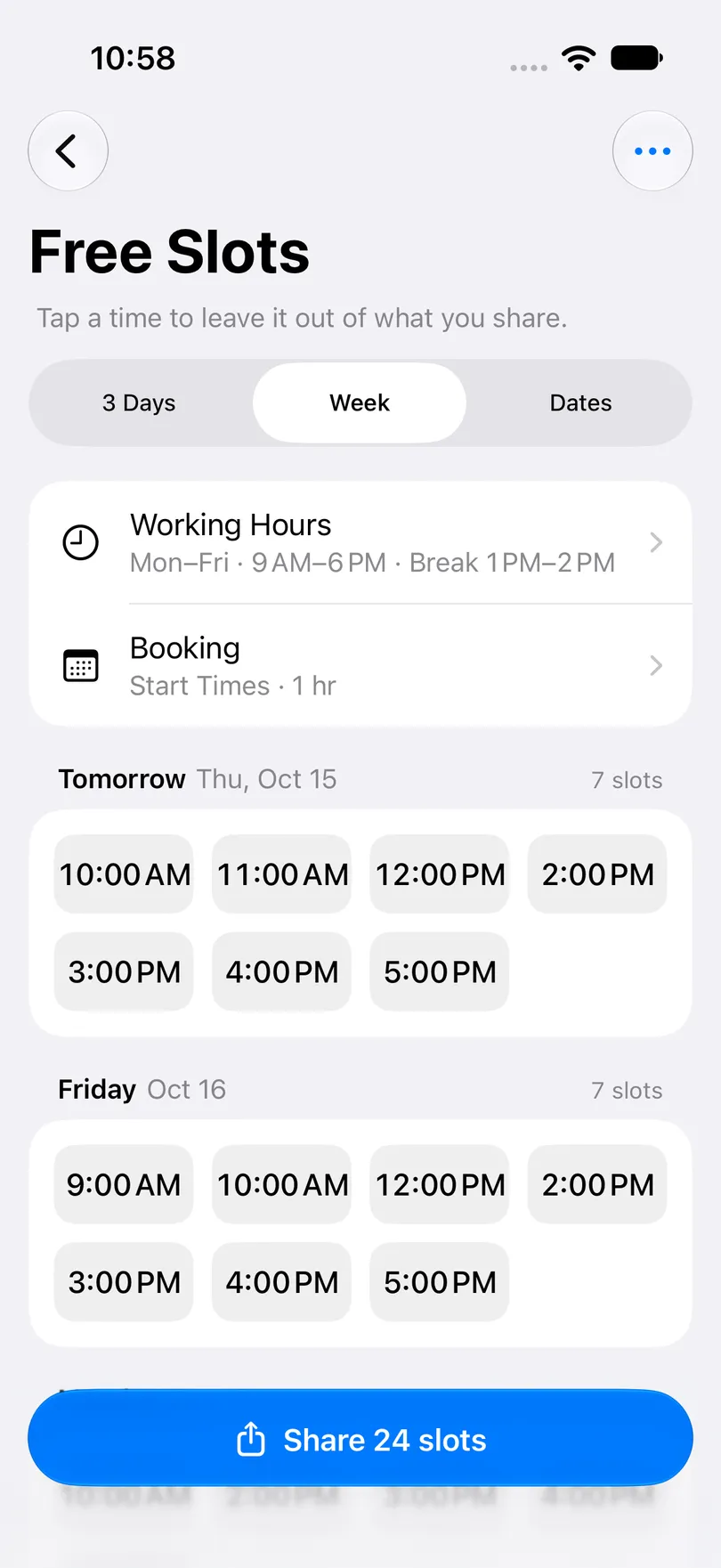
Pick the stretch you want to send at the top: 3 Days, a Week, or Dates for anything up to a month. Both 3 Days and Week start today. A working day with nothing left on it is marked Fully booked.
Before sending, tap any time to leave it out. That’s for the hour you’re keeping for a regular, or the late slot you’d rather not fill this week. The hidden times come back next time you open the screen, because by then the bookings will have moved on.
A picture for Stories, or a message for one client
Tap Share and choose the form.
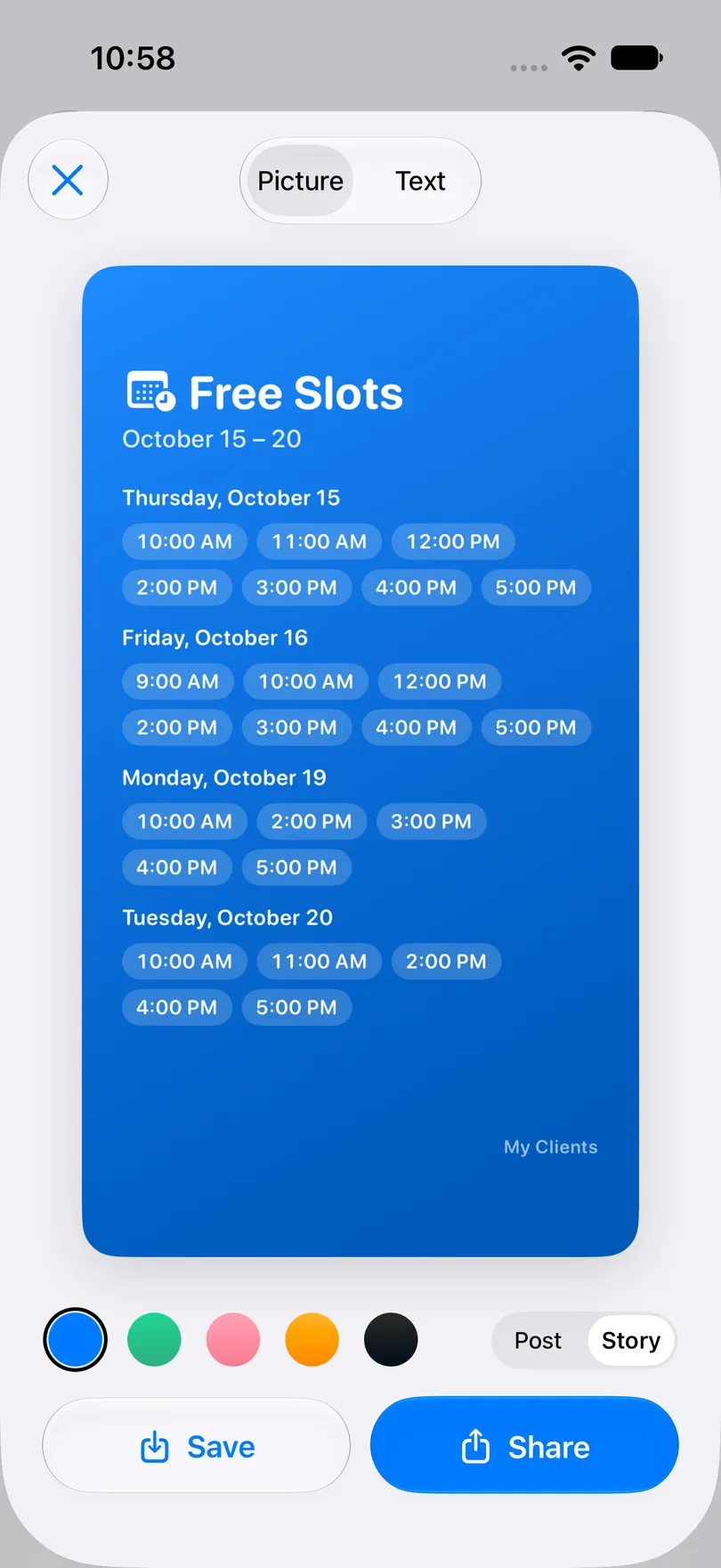
Picture makes a card in Story size for Instagram or Post size for a square feed post, in one of five colours: your app colour, green, pink, orange or dark. Save puts it in your photos, Share opens the usual share sheet for Instagram, WhatsApp or anything else. The card carries a small “My Clients” line at the bottom.
Text is for the client who’s asking right now, in a chat. It comes out like this:
Hi! Here are my free times for an appointment:
Tomorrow, Thu, Oct 15
10:00 AM, 11:00 AM, 12:00 PM, 2:00 PM–6:00 PMFriday, Oct 16
9:00 AM, 10:00 AM, 12:00 PM, 2:00 PM–6:00 PMMessage me to book your time
Four or more back-to-back times fold into one range, so a free afternoon fits on one line. Tap the first or last line to rewrite it in your own voice; the app keeps your wording for next time.
When to send it
The same screen does three different jobs, depending on when you open it:
- Sunday evening, to your Stories. The week ahead as a picture. People who were going to ask see the answer first, and the message you get on Monday already names a time: “Thursday at 2 please”.
- In the chat, when someone asks. Send the text for 3 Days. She sees Thursday as well as the Friday she asked about.
- When someone cancels. Touch and hold that day in the calendar and choose Free Slots for This Day. It opens with only that day, so the picture for your Story is ready while the slot is still worth something.
You still reply to every message, but most of them now arrive with a time already picked from the list, and those take one answer.
What it costs, and what it doesn’t do
- It’s part of Pro. Free Slots is a paid feature on both iPhone and Android. The free app still covers the everyday work: unlimited clients and bookings, visit history, this month’s income, reminders for you before each appointment, and no sign-up. The current price is in the app, and Apple or Google handle the billing.
- The client can’t book from it. What she gets is a picture or a message, not a link. She writes back, and you put the booking in yourself. That’s the point of it, but it does mean the picture is a snapshot: once a slot is taken, send a fresh one.
- It’s only as accurate as your durations. A booking with no duration counts as one appointment length. If your 90-minute treatments are saved as 60, the picture will offer times you don’t have.
- One break per day, and nothing for travel between clients. If you drive between home visits, the Break between setting is the only padding.
- Settings stay on each device. With iCloud sync on, your bookings reach the iPad, but working hours and booking settings don’t, so set them up on each device.
- On Android, there are no personal reminders, so only client appointments block time. Everything else works the same way.
The same thread, a week later
Anna writes again. This time it’s Sunday, 21:40, and she’s just seen your Story.
- 21:40, Anna: thursday 5 PM please!
- 21:43, you: Done, see you Thursday ✨
Two messages, three minutes, and she picked the day herself. Thursday was on the picture, so she never had to ask about Friday.
My Clients is free, needs no sign-up and works offline. With Pro, Free Slots turns your bookings into this week’s open times, as a Story picture or a message, in one tap.
You may also like
Start organizing your clients today